> ## Documentation Index
> Fetch the complete documentation index at: https://docs.schedo.dev/llms.txt
> Use this file to discover all available pages before exploring further.
# Jobs
> Learn about job definitions and execution
Jobs are the fundamental building blocks in Schedo.dev. A job represents a task that needs to be executed at specific times or intervals.
# Jobs
## Job Structure
A job in Schedo.dev consists of three main components:
```typescript theme={null}
schedo.defineJob(
'unique-job-id', // Identifier
'*/15 * * * *', // Schedule
async (ctx) => { // Handler
// Job implementation
return 'Job completed';
}
);
```
### Job Identifier
Every job requires a unique identifier. This ID is used to:
* Track job executions
* Reference the job in the system
* Configure job-specific settings
```typescript theme={null}
// Good identifiers are descriptive and unique
'daily-cleanup'
'hourly-metrics'
'weekly-report'
```
### Job Context
The job handler receives a context object (`ctx`) containing execution information:
```typescript theme={null}
async (ctx) => {
// Execution metadata
console.log(ctx.executionId); // Unique execution ID
console.log(ctx.jobCode); // Job identifier
// Job metadata
const metadata = ctx.getMetadata();
console.log(metadata);
}
```
### Job Return Values
Jobs can return a string that will be stored as the execution result:
In case your job returns a complex object, it will be serialised to JSON and stored as s string output
```typescript theme={null}
async (ctx) => {
const result = await processData();
return `Processed ${result.count} items`;
}
```
## Job Lifecycle
Jobs in Schedo.dev follow a simple lifecycle:
1. **Scheduled**: Job is waiting for its next execution time
2. **Running**: Job is currently executing
3. **Completed**: Job finished successfully
4. **Failed**: Job encountered an error
```typescript theme={null}
schedo.defineJob(
'example-job',
'0 * * * *',
async (ctx) => {
await processData();
return 'Job completed successfully';
}
);
```
## Job Configuration
Jobs can be configured with basic options:
```typescript theme={null}
schedo.defineJob(
'configurable-job',
'0 0 * * *',
async (ctx) => {
// Job implementation
},
withTimeout(seconds), // optinal execution timeout, default to 5 seconds
withMetadata({ owner: "analytics-team", priority: "high" }), // optional metadata to be passed to the job
withBlocking(true), // prevents another job instance from execution in case there is an existing one running
);
```
## Best Practices
While using Schedo SDK, we wrap job handler and track errors under the hood. Whenever your job execution will fail, you will see
an error in the dashboard.
1. **Error Handling**
```typescript theme={null}
async (ctx) => {
throw new Error('Failed to process users')
}
```
## Next Steps
Learn about scheduling options
Implement error handling
## Dashboard Overview
The dashboard provides a comprehensive view of your job statistics and current state:
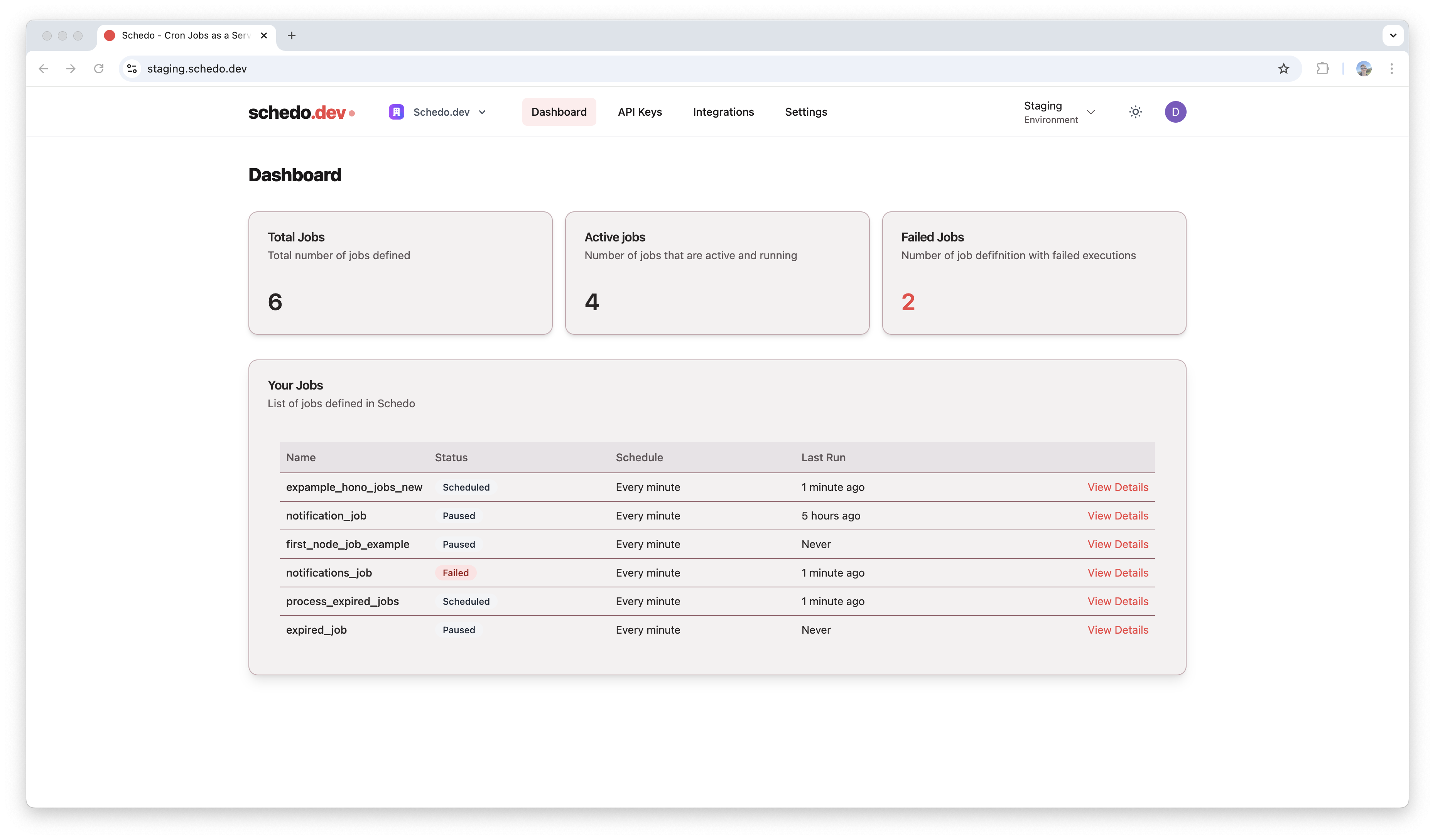 The dashboard shows:
* Total Jobs: Total number of jobs defined
* Active Jobs: Number of jobs that are active and running
* Failed Jobs: Number of job definitions with failed executions
## Job Details
Each job has detailed parameters and execution statistics:
The dashboard shows:
* Total Jobs: Total number of jobs defined
* Active Jobs: Number of jobs that are active and running
* Failed Jobs: Number of job definitions with failed executions
## Job Details
Each job has detailed parameters and execution statistics:
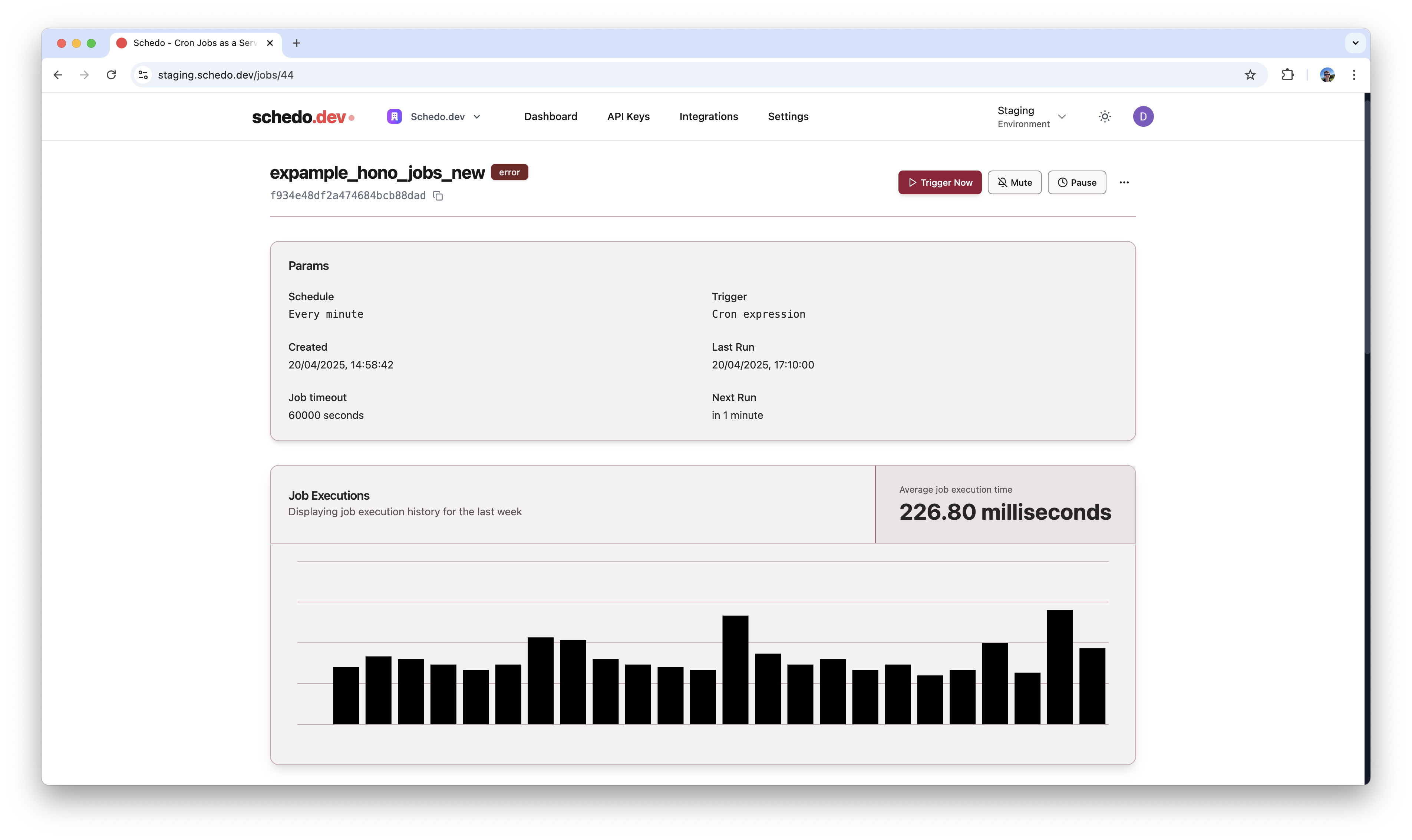 Key information includes:
* Schedule settings
* Job timeout
* Creation date
* Last and next run times
* Execution history graph showing average execution times
Key information includes:
* Schedule settings
* Job timeout
* Creation date
* Last and next run times
* Execution history graph showing average execution times