> ## Documentation Index
> Fetch the complete documentation index at: https://docs.schedo.dev/llms.txt
> Use this file to discover all available pages before exploring further.
# Error Handling
> Learn about error handling and retries in Schedo.dev
Schedo.dev provides error handling and retry mechanisms for your jobs.
## Basic Error Handling
When a job throws an error, Schedo.dev:
1. Captures the error details
2. Updates job status
3. Logs the failure
4. Initiates retry logic (if configured)
```typescript theme={null}
schedo.defineJob(
'example-job',
'* * * * *',
async (ctx) => {
try {
await riskyOperation();
} catch (error) {
// Rethrow to trigger retry mechanism
throw error;
}
}
);
```
## Retry Configuration
Configure retry behavior for your jobs:
```typescript theme={null}
schedo.defineJob(
'retry-example',
'0 * * * *',
async (ctx) => {
// Job implementation
},
{
// Retry configuration
retries: 3, // Number of retry attempts
retryDelay: 60000, // Delay between retries (ms)
}
);
```
## Error Context
Access error and retry information in the job context:
```typescript theme={null}
schedo.defineJob(
'context-example',
'0 * * * *',
async (ctx) => {
try {
await operation();
} catch (error) {
// Access execution context
console.log('Job failed:', {
jobCode: ctx.jobCode,
executionId: ctx.executionId,
attempt: ctx.attempt
});
throw error;
}
}
);
```
## Best Practices
1. **Error Handling with Retries**
```typescript theme={null}
async (ctx) => {
try {
await operation();
} catch (error) {
if (isTransientError(error)) {
throw error; // Let Schedo handle retries
} else {
// Handle non-retryable errors
console.error('Permanent failure:', error);
throw error;
}
}
}
```
2. **Resource Cleanup**
```typescript theme={null}
async (ctx) => {
let resource;
try {
resource = await allocateResource();
await useResource(resource);
} catch (error) {
throw error;
} finally {
if (resource) {
await releaseResource(resource);
}
}
}
```
## Job Execution Errors
When a job fails, you can view detailed error information in the job execution details:
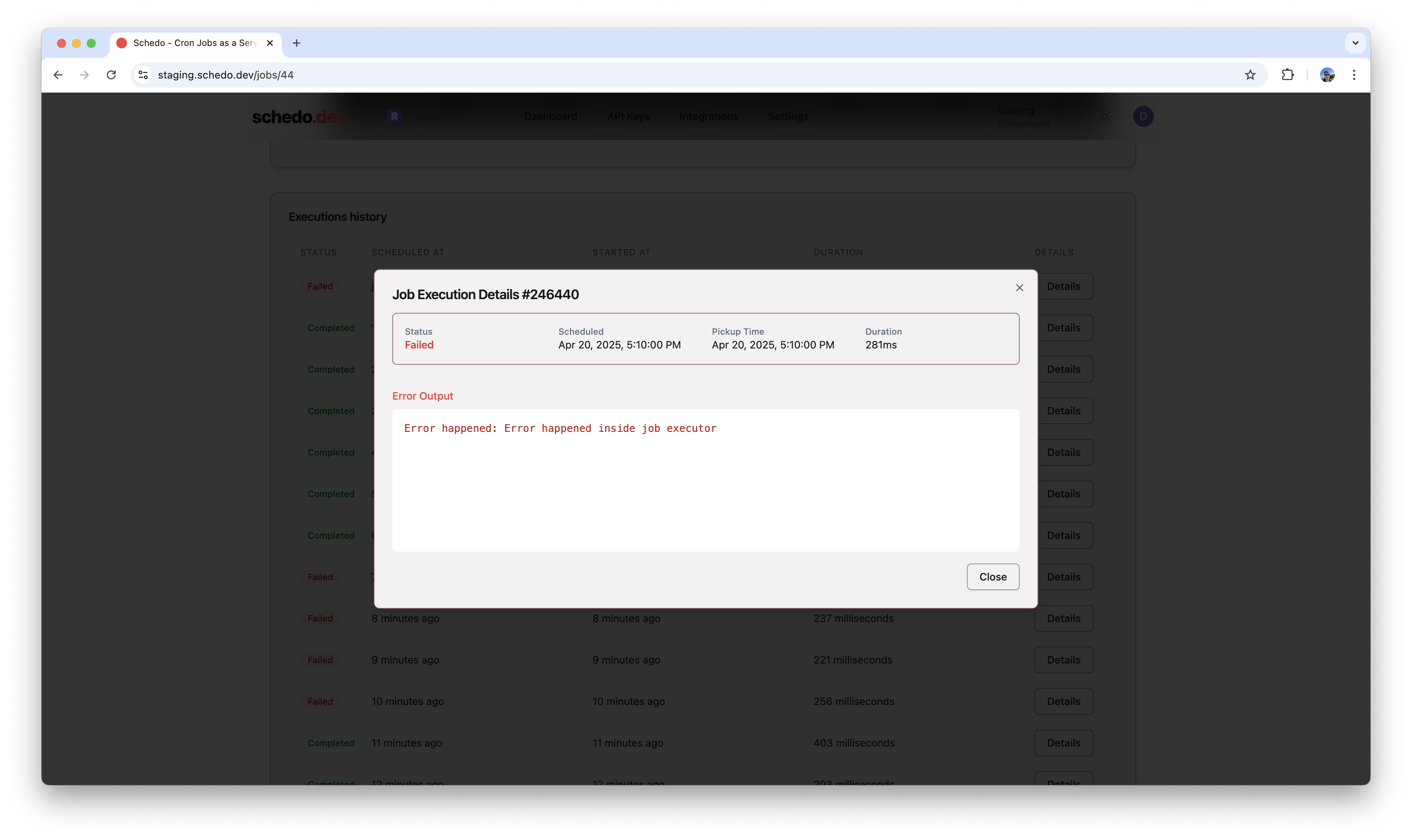 The error details include:
* Execution status
* Scheduled and actual pickup time
* Duration
* Error output and stack trace
## Next Steps
Learn about monitoring job executions
Learn about job definitions
The error details include:
* Execution status
* Scheduled and actual pickup time
* Duration
* Error output and stack trace
## Next Steps
Learn about monitoring job executions
Learn about job definitions